
How to Save Twitter/X Posts to Notion
Updated
X is where great threads, product launches and demo videos scroll past and vanish. A like or a bookmark is a black hole. This guide shows how to save an X post — thread, link or video — to Notion in one click, and how Clipno's newest feature can transcribe the video in a post and add an AI summary.
Short answer
To save a Twitter/X post to Notion, install the free Clipno extension for Chrome or Edge, open the post on x.com, and click the Clipno icon. The post — text, author, links and thread — lands in your Notion database in one click. New: if the post has a video, tick Save transcript and Generate AI summary before saving, and Clipno writes the video's transcript and an AI summary into the same Notion page.
Likes and bookmarks are where good posts go to die
You see a sharp thread or a demo video on X, tap the bookmark, and move on. A week later it's gone — buried under a thousand other bookmarks with no search, no tags, no notes. The best of X is worth more than a one-way trip into that pile.
Saving the post into Notion fixes that: it becomes a real page in a database you can search, tag and link to the rest of your notes. And because so much of X is now video — product demos, talks, walkthroughs — Clipno can go a step further and turn that video into text you can actually read and search, plus an AI summary, right inside the same page.
Save an X post to Notion in one click
Clipno reads the post straight from x.com and writes it into Notion as a clean page — with an option to transcribe and summarize any video it contains. Setup takes about two minutes.
- 1
Install the Clipno extension
Add Clipno to Chrome or Edge from the Chrome Web Store. The free plan includes 50 saves per month — no credit card required.
- 2
Connect your Notion workspace
Click the Clipno icon, sign in, and authorize the Notion workspace and database you want to save into. Clipno can also create a ready-made clips database for you.
- 3
Open the post on x.com
Open the tweet, thread or post you want to keep on x.com (t.co and twitter.com links work too). Clipno reads it directly from the page, so anything you can open in your browser can be saved.
- 4
Click Clipno — and tick transcript & AI summary for videos
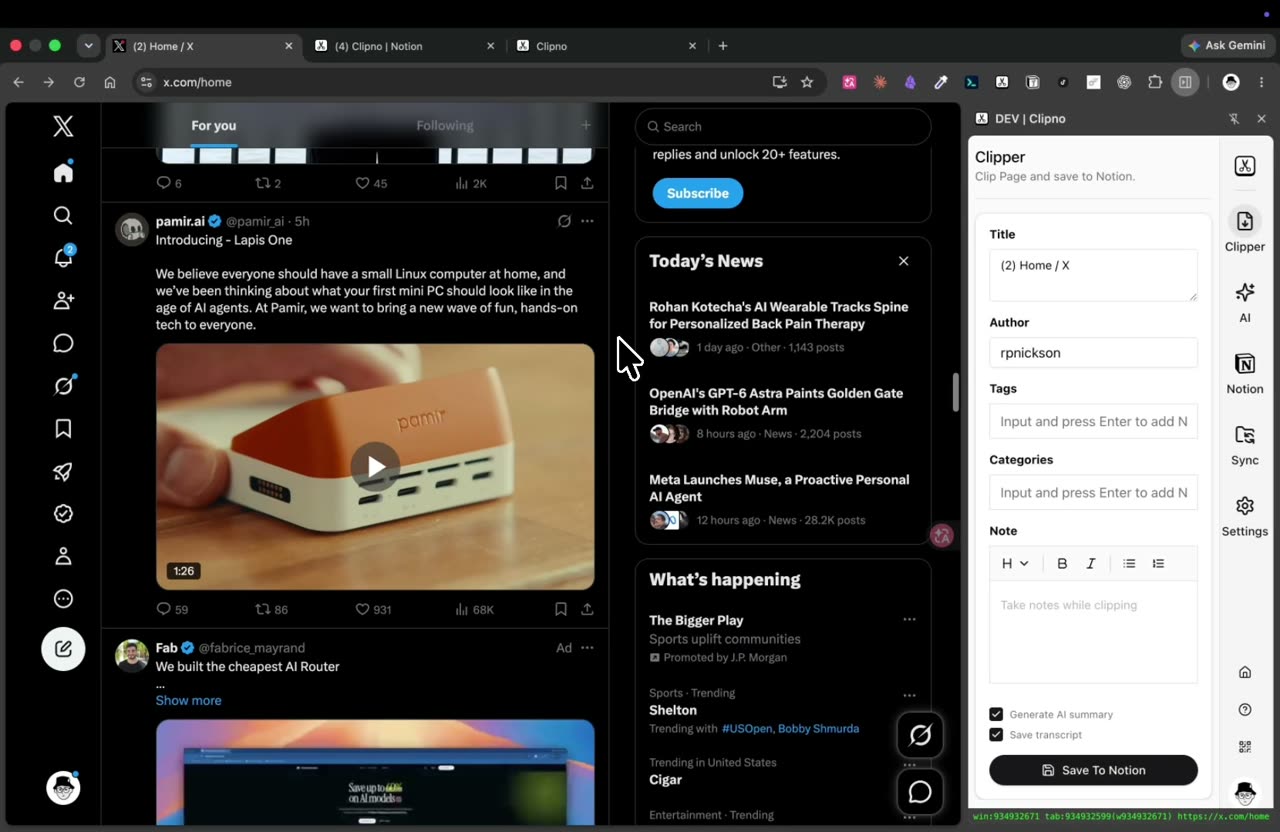
Clipno captures the post's title, author, text and source URL. If the post contains a video, tick Save transcript to turn the video into text and Generate AI summary for a short summary — then hit Save To Notion.
Saving an X post to Notion with Clipno — the post's video is transcribed and AI-summarized into the same page. - 5
Find it in Notion — searchable, with the transcript
The post arrives as a new page in your database with the source URL in its properties. If you enabled them, the video transcript and AI summary sit right there in the page — so a talk you never had time to watch is now readable and searchable.
Tips and common pitfalls
- Transcript + AI summary is the killer feature for video posts. A lot of X value is locked in demo clips and talks. Tick Save transcript and Generate AI summary, and Clipno reads the video for you and drops the text and a summary into Notion — no rewatching.
- It works for threads, not just single tweets. Open the thread and clip it; the connected posts come through as one Notion page instead of a lost bookmark.
- Turn your X bookmarks into a real library. Instead of an endless bookmark list you never revisit, each clipped post is a searchable, taggable Notion page next to the rest of your notes.
- It reads text inside images and videos, not just the caption. Tick Extract text from images to OCR screenshots, carousels and infographics into searchable text, and Save transcript to turn a video into text — both are written into the same Notion page and can feed the AI summary.
- The same one-click flow covers other social posts. Clipno also clips Instagram, Facebook, Threads, TikTok, YouTube, Reddit, LinkedIn and more — one clipper for everything you save from social.
- On iPhone or iPad, the Clipno iOS app and Shortcuts save X links from the share sheet, though transcript and AI summary are features of the browser extension.
Frequently asked questions
- How do I save a tweet to Notion?
- Open the post on x.com and click the Clipno browser extension. The tweet — text, author, links and thread — is written into your Notion database as a new page, no copy-paste. If it has a video, you can also transcribe it and add an AI summary in the same click.
- Can Clipno save a whole X thread?
- Yes. Open the thread on x.com and clip it, and the connected posts are saved together as one Notion page rather than a single tweet.
- Does it save the video in a post?
- Clipno saves the post and its source URL, and — new — can transcribe the video into text and generate an AI summary that it writes into the Notion page. Tick Save transcript and Generate AI summary before saving.
- Can I save my Twitter/X bookmarks to Notion?
- Open any bookmarked post on x.com and clip it with Clipno. Each one becomes a searchable, taggable Notion page — a far more usable library than the native bookmarks list.
- Can Clipno turn images or screenshots into text?
- Yes. Tick Extract text from images before saving and Clipno runs OCR on the post’s images — screenshots, carousels, infographics — and writes the recognized text into the Notion page, where it is searchable and can feed the AI summary.
- Is Clipno free?
- The free plan includes 50 saves per month with full feature access. Transcript and AI-summary generation have their own monthly free allowance; Pro raises the limits. Pro is $19.90 per year.
- Can I also save Instagram, Facebook or Threads posts to Notion?
- Yes — the same one-click flow works for Instagram, Facebook, Threads, Reddit, LinkedIn and many more sources.
Turn the best of X into a searchable Notion library
Install Clipno free and save X posts — with video transcripts and AI summaries — straight into Notion. Comparing clippers? See how Clipno stacks up against Save to Notion.